Variants: one camera, one light, only the facade changes
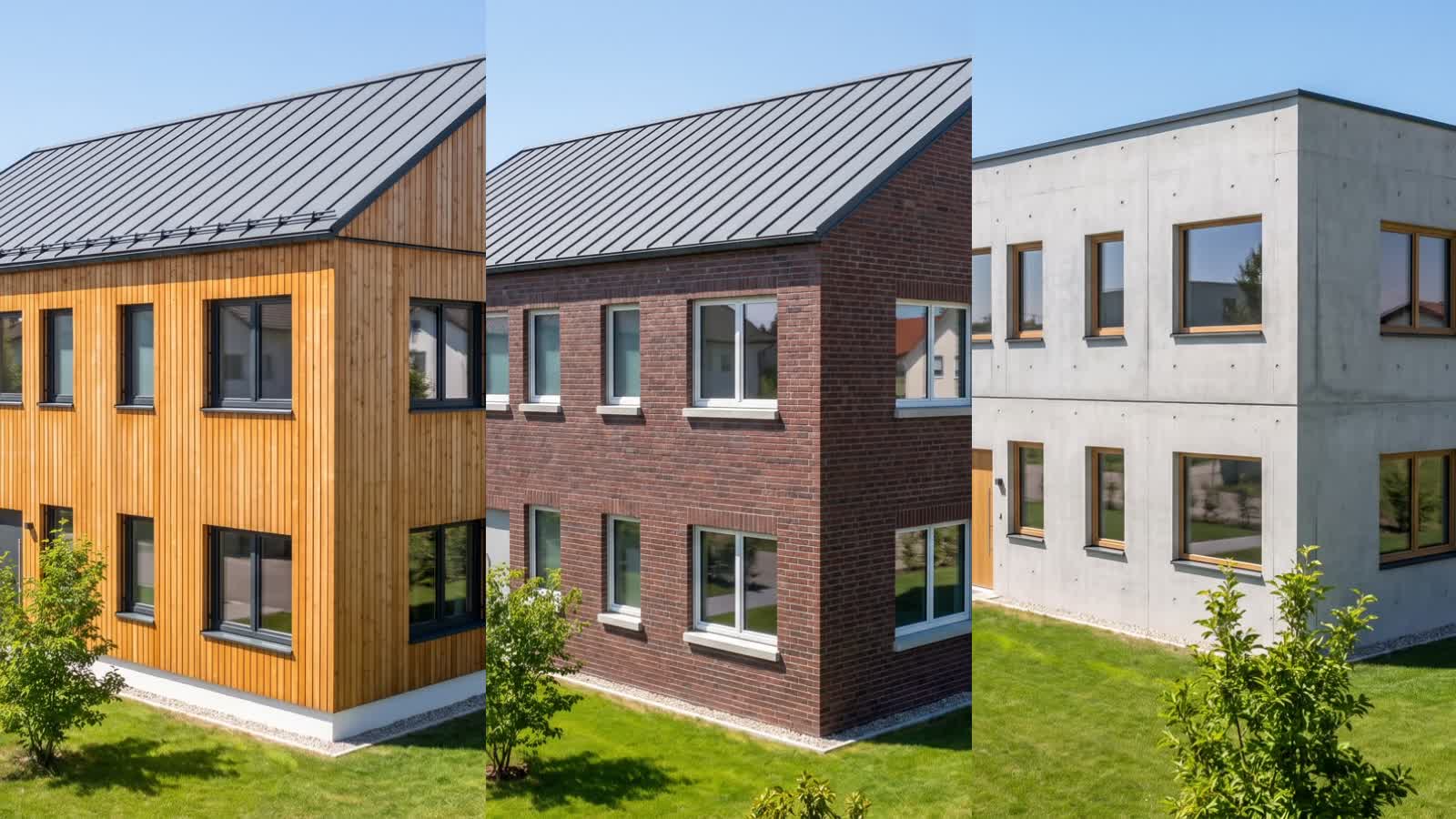
Two to six finishes of the same view: facade, window frames, roof or interior style change; camera, light and surroundings stay. The client compares them in a wipe and picks one.
1 to 8 points per picture, by quality level
In short
A variant set in VEDUTUM renders the same camera with the same light two to six times and changes one setting per picture: facade, window frames, roof or interior style. The first picture is made like any other; the rest get it as a reference, and the image model is asked to change only that setting and keep everything else identical. On the share page the pictures stand as a set, two tapped pictures lie in one wipe, and “This variant” reports the choice with a name to the office. Each picture costs the points of its quality level.
What it gives you
Comparable because equal
Camera, sun position and surroundings are the same in every finish. What differs is the one setting, not a randomly different sky.
A decision instead of a debate
The client sees larch next to brick in the same picture, drags the handle and chooses. The office gets name, time and note.
Price on the button first
A set costs as many pictures as it has finishes. Points and estimated duration are on the button before the run starts.
How it works
- 01Choose camera and lightUnder „Bilder & Videos“ (pictures and videos) choose „Varianten“, then the camera: the current view, one of the fixed standpoints or a room. Add the mood from „Mittag“ (noon) to „Winter“; a room needs none.
- 02Choose the settingOutside, the facade, the window frames or the roof changes; inside, the interior style. The first finish is the current design, so the set continues from what has already been agreed.
- 03Tap two to six finishesThe chips show the finishes from the model’s catalogue. The list below names each finish the way it will later read on the share page.
- 04Produce the setThe browser captures the model view per finish (another roof is other geometry) and renders the first picture first. The others run three at a time and get the first one as reference.
- 05Compare and shareIn the workspace, „Vergleichen“ (compare) shows two finishes in one wipe. On the share page the client taps two pictures, compares and picks with „Diese Variante“. You see the choice in the project’s share panel.
Why the first picture travels as a reference
Two separately rendered pictures of the same camera always differ a little: another sky, other trees, another shadow. For a material comparison that is noise. So the set renders the first picture as usual from model view, depth map and floor plan, and hands it to every further picture as a reference. The instruction to the image model names the one setting that changes and asks it to keep everything else as it is.
The image model follows that largely, not completely: small differences in planting or reflections remain possible. The geometry comes from the same model in every finish; for a roof variant the model is built with the other roof for the capture while the view on screen stays.
What happens on the share page
Pictures of a set do not appear one by one in the gallery but in their own section “Variants”, with the camera’s name and the number of finishes. Each card carries the name of its finish, such as “Larch wood” or “Brick · White”. Two tapped cards lie in the wipe the website uses too.
“This variant” asks for a name and an optional note. The choice then stands on the card (“Chosen by … on …”), in the project under the sign-off and as one line with the remarks; with a mailbox configured, a mail goes out. A new choice replaces the old one, and the office can reset it. A password-protected link accepts the choice only from a browser that entered the password; ten choices an hour per link.
Questions and answers
What does a variant set cost?
As much as its pictures: per finish the points of the chosen quality level, so 1, 4 or 8 points. Four facades in HD cost four points, in 2K sixteen. The button shows the sum first.
Can the client change the choice?
Yes. A new choice replaces the old one; the page always shows the latest with name and time. The office can reset the choice in the project; the pictures stay.
Can I render rooms as a variant set?
Yes. Choose a room as the camera; then the interior style changes: warm, loft, cool or classic. The furnishing follows the room name from the floor plan, the camera stays.
How is this different from comparing two single pictures?
Single pictures of the same camera can be compared on the share page too, but each was rendered on its own. In a set every further picture gets the first as reference, so sky, trees and shadows stay largely the same.
From the knowledge base
More features
Next step
Have a set rendered
Four facades in HD cost four points. The test account covers that, and the button shows the sum first.